Passport Photo Rules: A Guide to ICAO Biometric Compliance in 2026
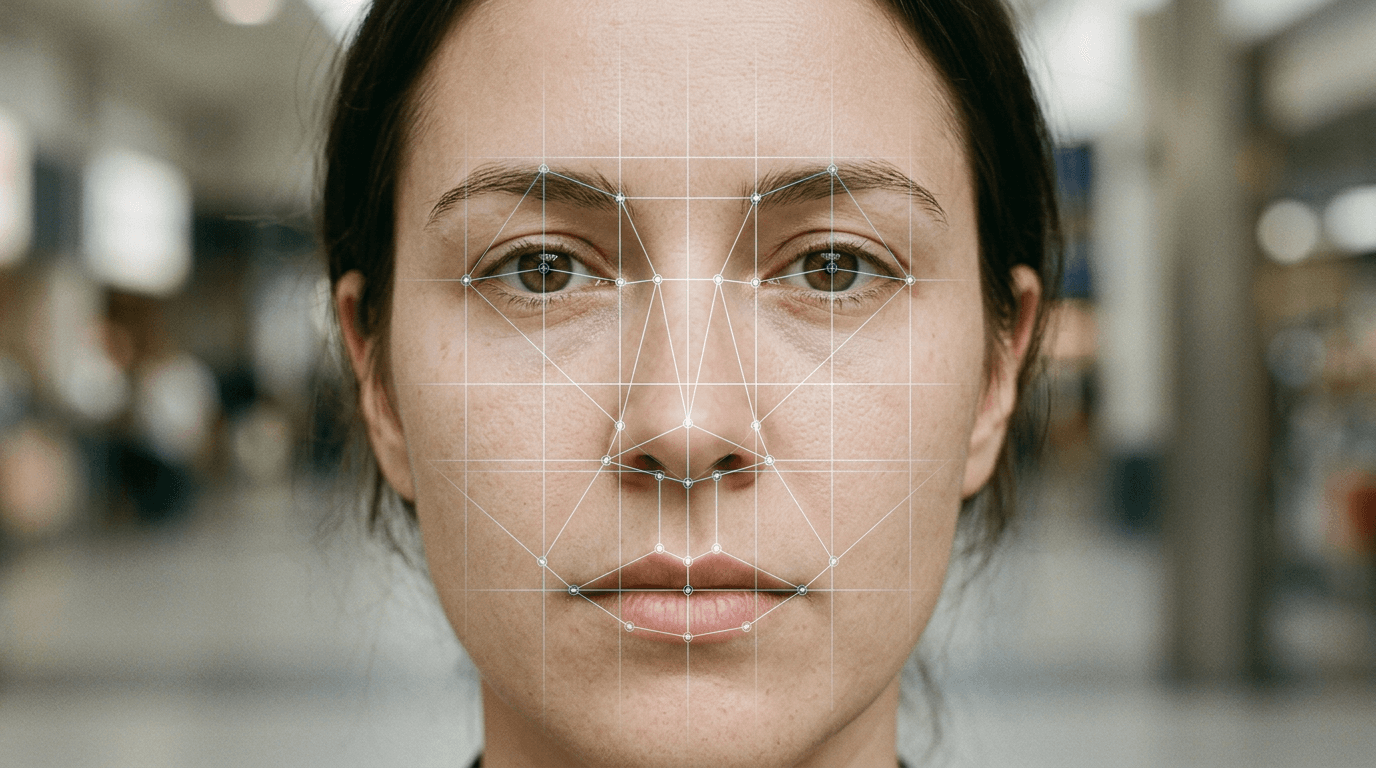
A rejected passport application usually does not start with a paperwork error; it starts with a parent standing over a wriggling newborn, trying to keep a white sheet smooth while avoiding overhead glare, only to realize the baby’s head is tilted three degrees too far. The International Civil Aviation Organization (ICAO) does not grade on a curve for infants. Their biometric standards dictate how facial recognition software maps the distance between pupils, the curve of a jawline, and the contrast against a background. Understanding how these passport photo rules apply in practice is the difference between an approved travel document and a six-week processing delay.
Quick Summary
Biometric passport photos must meet strict geometric and lighting standards to allow automated facial recognition systems to function correctly. Every element, from the percentage of the frame occupied by the face to the absolute absence of background shadows, is heavily regulated.
- The head must occupy the dominant portion of the total image height, leaving only narrow margins at the top and bottom.
- Backgrounds must be starkly plain, light-colored, and free of any textures or shadows.
- Facial expressions must remain entirely neutral with both eyes fully open and visible.
- Lighting must be even across the face to prevent asymmetric shadows that distort facial geometry.
- Infant photos require the same geometric precision, though some countries allow slight leeway for newborn eye status.
Table of Contents
- Passport Photo Rules
- Why Geometric Ratios Dictate Approval
- The Mechanics of Background Contrast
- How Lighting Causes Biometric Failures
- Applying ICAO Standards to Infants
- Common Rejection Modes
- Comparison Table of Global Photo Standards
- FAQ
- Recommended Reads
Passport Photo Rules
The core of modern travel documentation relies on biometric mapping. When border control software scans a passport image, it looks for anchor points: the center of each eye, the tip of the nose, and the edges of the mouth. If a photo fails to position these anchor points within the expected grid, the software flags the image as invalid before a human reviewer even sees it.
These automated checks require extreme standardization. You are not taking a portrait; you are creating a data set. The regulations enforced by the ICAO ensure that every passport issued globally can be read by the same automated gates at international borders. This is why a simple head tilt or a slight smile can instantly invalidate a submission. A smile shifts the cheekbones and alters the measurable distance between the lips and the nose, corrupting the biometric dataset.
Why Geometric Ratios Dictate Approval
Government guidelines typically state that the face must take up the dominant portion of the total vertical frame. This is not an aesthetic guideline; it is a hardware constraint. If the face is too small, the scanner cannot resolve the distance between the pupils with enough pixel density to verify identity. If the face is too large, the software cannot locate the outer edge of the jawline, which serves as a critical boundary marker.
The Vertical Axis Mapping
The most critical measurement is the distance from the bottom of the chin to the crown of the head. The crown is defined as the top of the skull, not the top of the hair. Voluminous hair must not be factored into this measurement, which is why individuals with high hairstyles often struggle to fit their actual face within the mandatory percentage while keeping their hair inside the frame.
Horizontal Centering
The nose must sit perfectly on the vertical centerline of the image. Even a minor rotation of the shoulders can cause the head to drift off-center. When positioning an applicant, the camera lens must be exactly level with the eyes, not pointed slightly down or up, which introduces vertical perspective distortion that shortens the apparent length of the nose or extends the forehead.
The Mechanics of Background Contrast
Algorithms use contrast detection to separate the subject from the background. The background must be uniform, meaning it cannot have gradients, patterns, or shadows. If a shadow falls on the wall behind the applicant's ear, the software may interpret that dark spot as part of the ear or hair, artificially widening the applicant's head in the biometric file.

Most jurisdictions demand a plain white or off-white background. The key word is plain. A textured white wall, such as painted brick or heavy stucco, introduces micro-shadows that algorithms interpret as noise. Using a smooth, matte white poster board or a tightly stretched, ironed white sheet is the only reliable way to achieve the required uniformity.
Practical rule: Always position the subject at least three feet away from the background surface to ensure their body does not cast a sharp shadow onto the wall behind them.
How Lighting Causes Biometric Failures
Lighting failures are the primary reason DIY passport photos are rejected. Automated systems reject asymmetric lighting because a shadow across half of the face obscures the exact location of the jawline and eye socket on that side.
Overexposure is equally fatal. When a flash washes out the bridge of the nose, it removes the contrasting pixels that tell the software where the nose ends and the cheek begins. This flattening effect prevents the system from generating a 3D topographic map of the face. For specific regional parameters, reviewing the United States Baby Passport Photo Guide demonstrates how strict these lighting rules are enforced.
Managing Glare and Reflection
Glasses are generally prohibited in modern passport photos specifically because of glare. Even an anti-reflective coating can bounce a pinpoint of light directly into the camera lens, obscuring the pupil. If the pupil is not visible, the primary anchor point for all facial recognition is lost. Similarly, red-eye reduction flashes cannot be used because they alter the natural color of the retina, which is occasionally checked in secondary biometric verification.
Applying ICAO Standards to Infants
Photographing a newborn for a passport is notoriously difficult because infants lack neck control. You cannot simply sit a three-week-old baby against a white wall. The standard approach involves laying the child flat on their back on a plain white blanket. However, this introduces new failure modes. The blanket must not bunch up around the ears, and there cannot be visible supporting hands in the frame.
While some countries are slightly more lenient regarding a newborn's neutral expression, the core geometric requirements remain absolute. The face must still occupy the correct percentage of the image, and the lighting must be even. Overhead lighting often casts heavy brow shadows on an infant lying flat, requiring careful positioning near a large, diffused window to achieve flat, even illumination. For a look at how different Commonwealth countries handle this, the United Kingdom Baby Passport Photo Guide outlines the specific tolerances for children under age one.
Common Rejection Modes
Rejections rarely happen because an image is completely illegible; they happen because one specific parameter falls outside the machine's tolerance window. Understanding these failure modes allows you to check an image before submission.
1. The Head Tilt
The software draws a horizontal line between the two pupils. If this line is not perfectly parallel to the top and bottom edges of the photograph, the image is rejected. This is highly common with infants whose heads naturally loll to one side when laid flat.
2. Incorrect Eye Level
If the camera is held too high, looking down at the subject, the forehead appears disproportionately large and the chin recedes. This perspective distortion causes the facial mapping algorithm to calculate the wrong distances between facial features. The lens must be exactly parallel to the subject's face.
3. Background Contamination
Any object other than the applicant's face invalidates the image. This includes a parent's fingers supporting a baby's neck, the edge of a car seat, or a pacifier string. If you need to understand exactly how strict European standards are on background purity, consulting the Germany Baby Passport Photo Guide provides a clear benchmark for Schengen compliance.
Comparison Table of Global Photo Standards
While ICAO provides the baseline, individual countries implement specific physical dimensions for their printed photos.
| Country | Print Size | Head Height Requirement | Background Color | Infant Eye Rule |
|---|---|---|---|---|
| United States | 2 x 2 inches (51 x 51 mm) | 1 to 1 3/8 inches | Plain White or Off-White | Eyes can be slightly closed for newborns |
| United Kingdom | 35 x 45 mm | 29 to 34 mm | Cream or Light Grey | Children under 1 do not need eyes fully open |
| Australia | 35 x 45 mm to 40 x 50 mm | 32 to 36 mm | Plain White or Light Grey | Infants under 3 can have mouth slightly open |
| Canada | 50 x 70 mm | 31 to 36 mm | Plain White or Light Colored | Strict neutral expression required regardless of age |
FAQ
Do ears need to be visible in a passport photo?
Generally, yes. While not strictly mandatory in every single country, keeping hair tucked behind the ears ensures the jawline is fully visible, which is a hard requirement for biometric mapping.
Can I edit out the background of a photo?
Manual manipulation of the image using general photo editing software often leaves digital artifacts that automated systems flag as tampering. Purpose-built tools that utilize biometric algorithms to separate the foreground do this cleanly, but manually painting a background white is a frequent cause for rejection.
What happens if the baby is crying in the photo?
A crying baby will have an open mouth and squinched eyes, violating the neutral expression and open-eye mandates. The photo must be retaken when the child is calm and relaxed.
How old does a photo need to be?
Almost all jurisdictions mandate that a passport photo must be taken within the last six months to accurately reflect your current appearance.