Navigating Global Biometric Standards for a Passport Photo in 2026
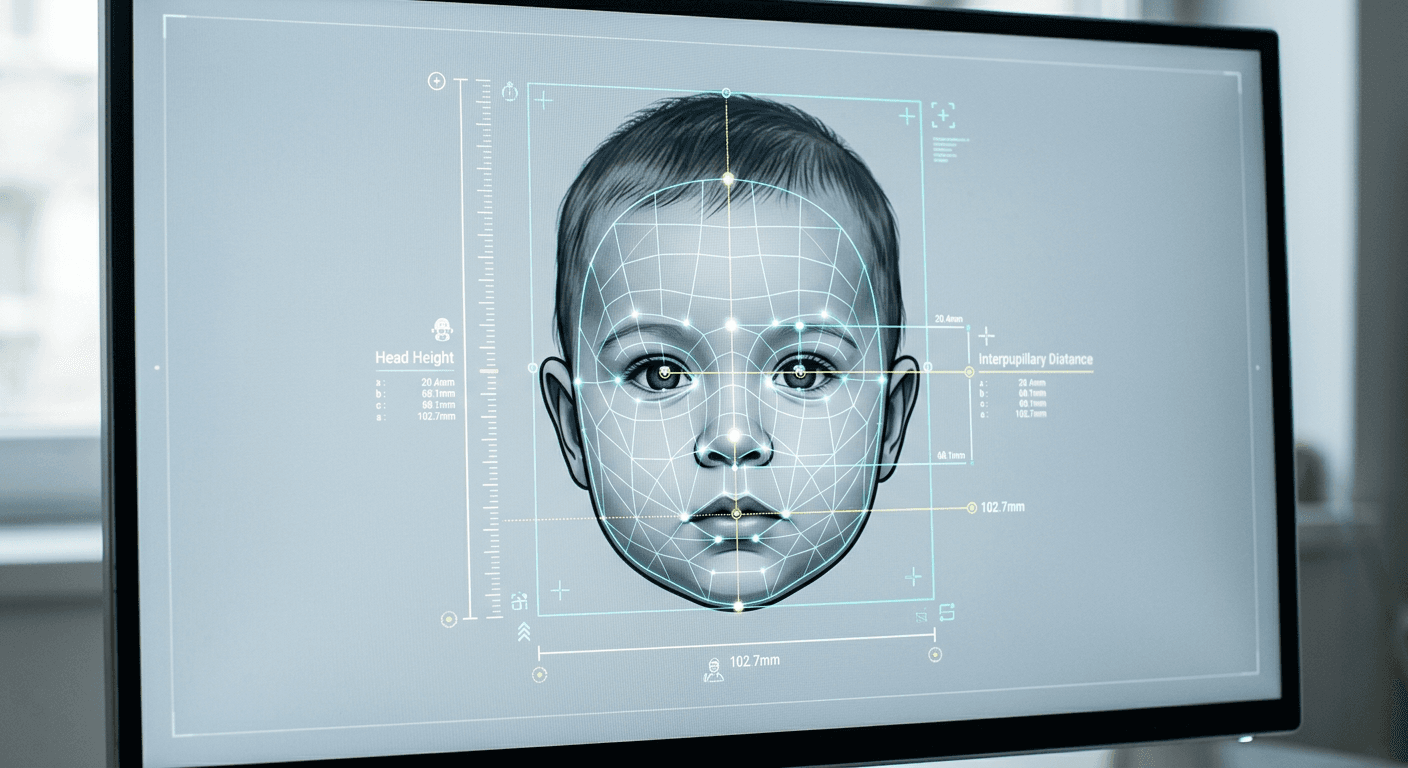
A parent positioning a wriggling infant on a plain sheet, adjusting overhead lights to eliminate a tiny drop shadow beneath the chin, knows the stakes of a passport photo capture. The slightest deviation - an open mouth, a visible parental hand, or a shadow that tricks an algorithm into miscalculating jaw width - triggers an automatic rejection from a government biometric database, delaying travel by weeks.
Quick Summary
Biometric identification relies on strict geometric and lighting parameters rather than just a clear image. A valid travel document requires precise head-to-image ratios, shadow-free illumination, and unaltered backgrounds that pass automated algorithmic checks.
- Standard biometric scanners measure facial landmarks rather than subjective image quality.
- Focal length distortion from standard smartphone cameras routinely invalidates interpupillary distance metrics.
- Infant captures require specific support strategies to keep parental hands entirely out of the frame.
- Automated background removal tools must not artificially crop the subject's hairline or jawline.
Table of Contents
- Why your submission fails the automated biometric scan
- Where UK passport photo requirements dictate millimeter precision
- How lighting geometry breaks a passport format photo
- The physical mechanics of capturing an infant subject
- Why an Italy passport photo relies on strict Schengen tolerances
- Where UK passport photo guidelines contradict global norms
- The file data behind digital biometric validation
- Analyzing physical specifications across major jurisdictions
- FAQ
- Recommended Reads
Why your submission fails the automated biometric scan
Government agencies no longer rely on clerks to visually assess a portrait. Instead, submissions are parsed by biometric software that isolates the face and maps approximately 68 specific nodal points. These systems measure the precise distance between the pupils, the width of the nose, and the depth of the eye sockets.
When a standard smartphone lens is placed 30 centimeters from a subject's face, it introduces severe barrel distortion. This optical phenomenon makes central features like the nose appear disproportionately large while pushing the ears backward out of the frame. To the biometric algorithm, this distorted geometry belongs to a fundamentally different facial structure, resulting in an immediate rejection.
To bypass this failure mode, the camera must be placed at least 1.5 meters away from the subject, utilizing a telephoto or zoomed lens setting to compress the facial features into an accurate, flat representation. You can verify this by checking if the subject's ears are clearly visible in the preview; if they recede behind the cheekbones, the camera is too close.
Where UK passport photo requirements dictate millimeter precision
Navigating UK passport photo requirements involves understanding some of the most rigid physical printing constraints in the world. The specifications demand that the subject's head occupies a highly specific vertical window: it must measure between 29mm and 34mm from the crown of the head to the tip of the chin within a 35x45mm frame.
Beyond size, the physical background color is uniquely specific. Unlike many global standards that demand pure white, the UK mandates a light grey or cream background. Pure white backgrounds often cause the edges of pale skin or light-colored hair to blend into the surrounding space, which breaks the edge-detection algorithms used by His Majesty's Passport Office. The scanner must be able to detect a continuous, sharp line around the entire perimeter of the subject's head.
Parents navigating these exact constraints can review the United Kingdom Baby Passport Photo Guide for detailed breakdowns of how these dimensional rules apply when a subject lacks a fully developed jawline or cannot sit upright.
How lighting geometry breaks a passport format photo
Lighting a passport format photo is an exercise in optical physics, not artistic portraiture. Standard domestic lighting usually comes from a single overhead source, which casts deep, sharp shadows beneath the eyebrows, nose, and chin. Biometric software interprets these heavy shadows as solid physical features or missing data, flagging the image as obscured.
Furthermore, if the subject stands too close to the background wall, the light will cast a harsh drop shadow behind their shoulders. This ruins the digital segmentation mask, making it impossible for the system to isolate the subject from the background. The solution requires diffuse, horizontal lighting.
Practical rule: Position the subject facing a large window during daylight hours, ensuring they stand at least half a meter away from the background wall to allow background shadows to fall completely out of the frame.
Color rendering is equally critical. Household LED bulbs often have a low Color Rendering Index (CRI), meaning they lack specific wavelengths of light. This casts an unnatural green or magenta tint onto the skin, which fails the automated natural skin tone validation check.
The physical mechanics of capturing an infant subject
Infants cannot follow instructions to maintain a neutral expression, close their mouths, or look directly at a camera lens. Consequently, capturing compliant documentation for newborns requires mechanical workarounds rather than behavioral cues.
The standard approach involves laying the infant flat on their back on a plain, light-colored sheet. However, gravity pulls the facial tissue back toward the ears in this position, slightly altering the biometric profile. To counteract this, placing a rolled towel beneath the top of the sheet to slightly elevate the baby's head keeps the facial structure natural while satisfying the requirement for a front-facing angle.
A primary failure point is the visibility of support structures. Parental hands, pacifiers, headbands, or patterned clothing visible near the neckline will trigger an automated rejection. For a broader look at international tolerances regarding infant exemptions, the Baby Passport Photo Requirements by Country - 100+ Guides resource details the specific age cutoffs for closed eyes and open mouths across different jurisdictions.
Why an Italy passport photo relies on strict Schengen tolerances
Generating an Italy passport photo requires strict adherence to the standards outlined in ICAO Document 9303, which governs the Schengen Area's travel documentation. While the outer dimensions remain 35x45mm, the European standard aggressively focuses on the head-to-image ratio, demanding that the subject's face covers 70 to 80 percent of the vertical frame (equivalent to 32mm to 36mm).
Unlike the UK, the Italian authorities mandate a pure white background with zero textural patterns. This creates a highly specific technical challenge: illuminating a white background enough to render it pure white in the camera without causing light to bounce back into the camera lens. This bounce-back, known as halation, wraps around the subject's hair, eating away at the visible edge of the head and causing immediate rejection at the Questura or consulate.
Those familiar with the strict implementation of European border standards often look to the Germany Baby Passport Photo Guide to understand how uniformly these ICAO background rules are enforced across the continent.
Where UK passport photo guidelines contradict global norms
UK passport photo guidelines have diverged from traditional global norms by heavily prioritizing digital photo codes over physical prints. Instead of handing a printed photograph to a clerk, applicants frequently provide a unique digital code. This shifts the validation burden entirely to the point of capture.
This digital-first approach means that applicants must now manage file metadata and compression artifacting. If an image is heavily compressed to save storage space on a smartphone, it develops tiny, blocky distortions around high-contrast areas like the jawline. Automated portals scan for these artifacts, often misinterpreting them as evidence of digital manipulation or background replacement.
Modern guidelines strictly forbid altering the background manually using generic photo editing software. If an editing tool creates an artificially sharp, pixel-perfect line around frizzy hair, the government's anti-fraud algorithms will detect the digital alteration and reject the application. The system requires natural edge degradation to prove the image is authentic.
The file data behind digital biometric validation
When submitting a digital file directly to a government portal, the visible image is only half of the required data. The file's internal metadata and color space profile dictate how the image renders on the examiner's screen.
Most modern smartphones capture images in the Display P3 color space, which holds a wider range of colors than older monitors can display. However, government databases generally require the older sRGB color space. When a portal forcibly converts a P3 image to sRGB during upload, the colors can shift dramatically, turning a natural skin tone into a dull, greyish hue that fails compliance checks.
Additionally, EXIF orientation data can cause an image that looks perfectly upright on a phone to load sideways into a legacy government database. You can check your file's viability by ensuring it is exported strictly as a baseline JPEG, under 10MB in size, with all rotation metadata stripped or hard-baked into the image orientation before uploading.
Analyzing physical specifications across major jurisdictions
The mathematical tolerances for biometric submissions vary significantly across borders. Applying one nation's logic to another's application guarantees a rejection.
| Jurisdiction | Outer Dimensions | Head Size Requirement | Background Color | Digital Code System |
|---|---|---|---|---|
| United Kingdom | 35x45mm | 29mm - 34mm | Light grey or cream | Yes |
| Schengen (Italy) | 35x45mm | 32mm - 36mm | Pure white | Varies by state |
| United States | 2x2 inches | 1 - 1.375 inches | White or off-white | Rare/Limited |
| Canada | 50x70mm | 31mm - 36mm | Plain white or light | No |
Reviewing these constraints reveals that no single file can satisfy all global requirements simultaneously. The aspect ratio of a US square format simply cannot be cropped into a European rectangular format without violating the stringent head-size percentages.
FAQ
Can I use a smartphone portrait mode for biometric documents?
No. Built-in smartphone portrait modes use artificial intelligence to blur the background, which creates synthetic edges around the subject's hair and clothing. Biometric scanners detect this artificial edge generation and reject the file for digital manipulation.
Why was my submission rejected for a background shadow?
Shadows create varying gradients of color on the background. Automated segmentation software requires a uniform block of color to accurately separate the subject from the wall. A drop shadow tricks the software into thinking the background is part of the subject's physical profile.
Do infant subjects need to look directly at the camera?
Rules vary strictly by jurisdiction. In the UK, infants under one year old do not need to have their eyes open, nor do they need to look directly at the lens. However, the face must still be positioned squarely to the camera without tilting up or down.
What causes an automated system to flag a natural skin tone?
Using household lighting with a low Color Rendering Index (CRI) or mixing daylight with artificial tungsten bulbs creates a color cast. The camera's sensor captures this as a green or magenta tint, which fails the algorithm's predetermined acceptable skin tone parameters.