Tutto sulla Foto Digitale Formato Tessera: Risoluzione e Requisiti
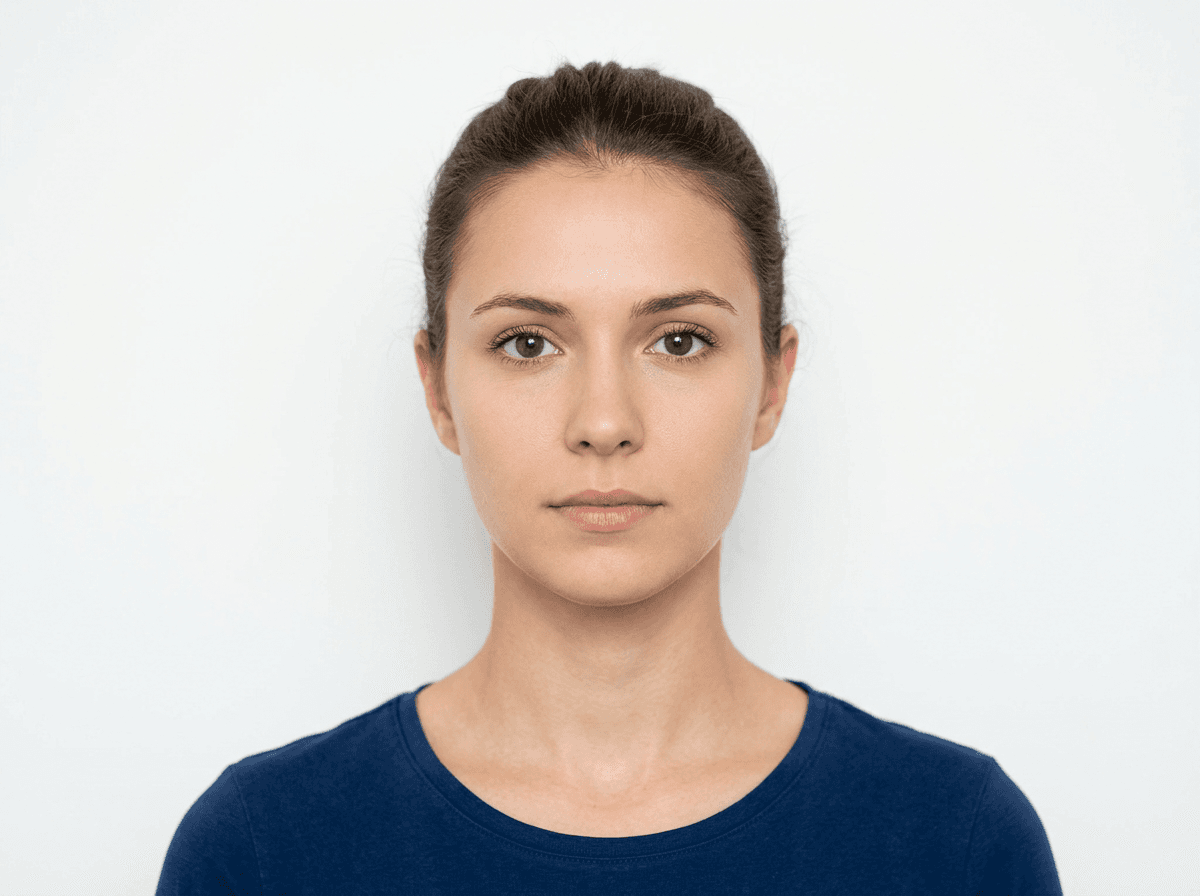
Creating a professional foto digitale formato tessera is no longer a task confined to physical photo booths or specialized studios. With the modernization of government identity document systems, understanding the precise technical specifications for a passport format photo is essential for ensuring your application is processed without delay or rejection due to non-compliance. Whether you are aiming to secure a new travel document or renew an existing one, mastering the digital requirements is the first step toward a successful submission.
Quick Summary {#quick-summary}
A digital passport photo is a high-resolution, biometric-compliant image that adheres to specific international standards regarding dimensions, lighting, and composition. It must clearly identify the applicant without obstructions or digital manipulation.
- File size and resolution must meet specific pixel requirements.
- The background must be uniform, typically plain white or off-white.
- Neutral facial expressions are mandatory to satisfy biometric scanning.
- Avoid shadows, reflections, and common accessories like headwear or glasses.
Table of Contents {#table-of-contents}
- Understanding Digital Passport Standards
- Essential Technical Specifications
- Composition and Biometric Requirements
- Benefits of Creating a Passport Photo Online
- Avoiding Common Pitfalls in Passport Image Processing
- FAQ
- Recommended Reads

Understanding Digital Passport Standards {#understanding-digital-passport-standards}
Global standards for travel documentation are governed by the International Civil Aviation Organization (ICAO). These regulations ensure that any foto per passaporto elettronico can be seamlessly integrated into digital reading systems used at border controls. When you create a digital file, you are essentially providing the raw data that will be printed onto the polycarbonate page of your passport or stored within the embedded RFID chip.
Because these images are processed by automated software, the margin for error is nearly zero. Even slight deviations in head tilt, background consistency, or contrast can trigger a rejection from the issuing authority's quality control systems. It is vital to consult the official passport photo guide before you capture your image to ensure you understand the specific nuances of your country's requirements.
Essential Technical Specifications {#essential-technical-specifications}
Technical compliance centers on three pillars: resolution, file size, and file format. Most authorities require the image to be in JPEG format. The resolution should be high enough to allow for a sharp print-out—typically at least 300 to 600 dots per inch (DPI). If the file is too compressed, the resulting image will appear pixelated, which is a common cause for rejection.
Beyond resolution, the aspect ratio is strictly enforced. While dimensions may vary by jurisdiction—for example, the US baby passport photo standards differ slightly from the UK baby passport photo requirements—the principle remains that the face must occupy a specific percentage of the total image area. Always verify whether your target agency requires a square aspect ratio or a specific rectangular proportion.
Pro Tip: Never use software to upscale a low-resolution image. Upscaling generates artificial pixels that cause "blurriness" or "artifacting," which automated systems will instantly flag as non-compliant.
Composition and Biometric Requirements {#composition-and-biometric-requirements}
Biometric systems rely on the ability to map facial landmarks—the distance between the eyes, the chin, and the nose bridge. This is why a neutral expression with the mouth closed is standard. If you are smiling, it can distort the biometric markers that the software uses to verify your identity against the physical person standing at a border gate.
Lighting is equally important. Your face must be illuminated evenly. Shadows cast by overhead lights or improper positioning are detrimental. Ideally, you should stand roughly 50-100 centimeters away from a plain, light-colored wall to minimize background shadows. If you are preparing images for dependents, ensure you refer to resources like the Canadian baby passport photo documentation to handle the unique challenges of infant photography.
Benefits of Creating a Passport Photo Online {#benefits-of-creating-a-passport-photo-online}
Leveraging a passport photo online platform provides the flexibility to retake your shot until it perfectly matches the guidelines. Unlike a physical booth, where you may be rushed or have limited control over the lighting, digital tools allow for precise alignment using overlays that indicate where your eyes and chin should sit within the frame.
Using an online service also helps in verifying that your image meets the required dimensions before you ever pay for a print. Many users find that consulting a professional help portal can clarify questions about dress codes, such as whether head coverings for religious reasons are permitted, which is a standard exception in many jurisdictions.
Avoiding Common Pitfalls in Passport Image Processing {#avoiding-common-pitfalls-in-passport-image-processing}
One of the most frequent mistakes users make is attempting to manually edit the background. Unless you are an expert in non-destructive photo editing, cropping out a background often leaves jagged edges or "halos" around the hair, which authorities interpret as evidence of tampering or digital fraud. If your original photo has a messy background, it is better to take a new photo than to try to hide the environment with software.
Furthermore, avoid wearing glasses unless medically necessary, and even then, ensure there is no glare on the lenses. Glare can obscure your pupils, which is a critical point for facial recognition algorithms. When you work with a trusted passport photo service, you gain the benefit of an automated check that screens for these common failures before you submit your file for official processing.
FAQ {#faq}
Can I wear glasses in my digital passport photo? Most authorities now strictly forbid glasses in passport photos to prevent light reflection and ensure the eyes are perfectly visible to facial recognition systems.
What is the best file format for a passport photo? JPEG is the industry standard for digital passport photos due to its balance between file size and image quality, making it compatible with almost all government submission portals.
Can I use a photo taken with my smartphone? Yes, provided the smartphone has a high-quality camera and you adhere to lighting and distance requirements. Ensure the background is plain and there are no harsh shadows on your face.
How can I ensure my photo is compliant before submitting it? Use an online validation tool or consult the official government guidelines for your specific country to check your photo against the required dimensions and biometric standards.