Essential Guide: UK Passport Photo Requirements
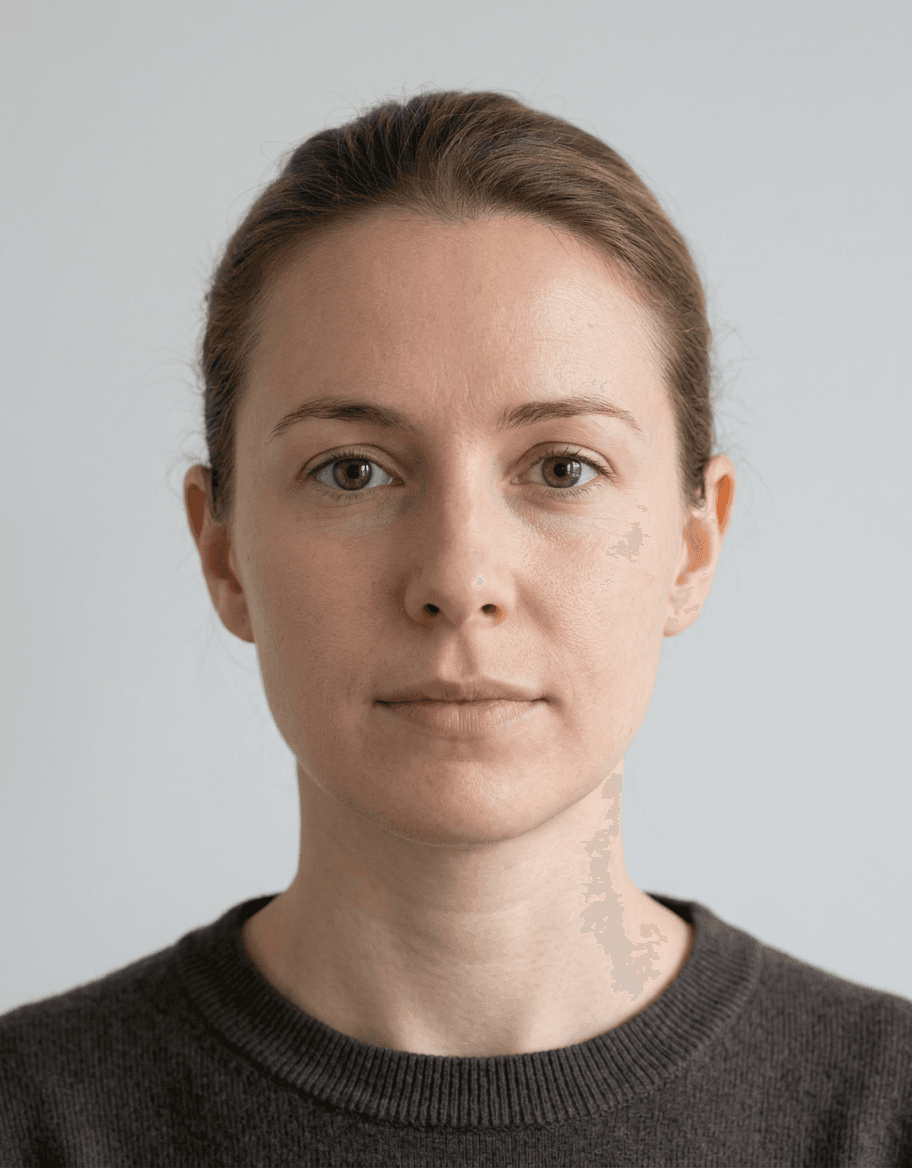
Obtaining a valid travel document starts with mastering the official passport photo requirements UK, as even minor deviations can lead to application delays or outright rejection. Understanding the precise standards set by His Majesty’s Passport Office is crucial for anyone preparing to travel, as these strict guidelines cover everything from lighting and composition to the subject's expression.
Quick Summary {#quick-summary}
Passport photo requirements UK dictate that images must be clear, color-accurate, and recent (taken within the last month). They must follow specific dimensions of 35mm wide by 45mm high, feature a plain light-colored background, and show a neutral expression without accessories obscuring the face.
- Dimensions: 35mm width x 45mm height.
- Background: Plain, light gray, or cream.
- Expression: Neutral, mouth closed, eyes open.
- Quality: Sharp focus, no shadows or glare.
Table of Contents {#table-of-contents}
- Quick Summary
- Understanding Official Passport Photo Guidelines UK
- Technical Specifications and Dimensions
- Lighting, Contrast, and Background Standards
- Subject Positioning and Expression Rules
- Handling Accessories and Headwear
- Digital vs. Physical Photo Submission
- Frequently Asked Questions
- Recommended Reads

Understanding Official Passport Photo Guidelines UK {#understanding-official-passport-photo-guidelines-uk}
The passport photo guidelines UK are designed to ensure that biometric scanners and border control software can accurately map your facial features. Because modern passports are essentially identity tokens that rely on facial recognition technology, the government enforces standardized imagery to minimize human error and fraud. Failure to adhere to these rules is the most common reason for application delays.
When preparing your submission, you must provide a photo that is a true likeness of your current appearance. You should refer to the comprehensive guide to passport photo standards to ensure you are not missing any nuanced requirements that have been updated recently. A photograph that is blurry, pixelated, or poorly exposed will be rejected regardless of how accurate the dimensions might be.
Technical Specifications and Dimensions {#technical-specifications-and-dimensions}
Strict adherence to physical dimensions is the foundation of a compliant image. The standard size required is 35mm in width by 45mm in height. It is important to note that the head size within the photo—measured from the crown of the head to the chin—should occupy between 29mm and 34mm of the total height.
If you are using an automated tool to crop your image, ensure the resolution is set high enough so that no digital artifacts or jagged edges appear when the file is printed. If you need assistance with specific formatting requirements for children or infants, you can check the UK baby passport photo guide for specialized advice on getting the right shot for younger applicants.
Lighting, Contrast, and Background Standards {#lighting-contrast-and-background-standards}
Lighting is perhaps the most difficult variable for amateurs to control. The goal is even illumination across the face to prevent harsh shadows, particularly under the eyes, nose, or chin. Avoid direct flash that causes "red-eye" or reflections on the skin, as these interfere with biometric matching algorithms.
Your background must be a plain, light-colored surface—typically cream, light gray, or off-white. The background should be completely free of patterns, textures, or shadows. Using a wall in a well-lit room away from direct sunlight is often the best strategy to achieve the necessary neutral backdrop without relying on a professional studio setup.
Subject Positioning and Expression Rules {#subject-positioning-and-expression-rules}
Face the camera directly with your head centered and squared off. You must not look over either shoulder, nor should you tilt your head. The posture should be natural but upright, with your shoulders visible in the frame.
Your facial expression is equally important: you must have a neutral expression with your mouth closed. Do not smile, frown, or raise your eyebrows. Your eyes must be fully open and clearly visible; if you have hair that obscures your eyes, you must pin it back to ensure the entire facial structure is unobstructed and identifiable.
Pro Tip: Avoid wearing glasses whenever possible. If you must wear them for medical reasons, they cannot have tinted lenses, and the frames must not obstruct your eyes or create glare on the lenses. In most cases, it is safer to remove them entirely to avoid rejection.
Handling Accessories and Headwear {#handling-accessories-and-headwear}
General rules dictate that you must remove hats, caps, and headbands for the photograph. There is an explicit exception for head coverings worn for religious or medical reasons. If you wear a head covering for these reasons, it must be plain and positioned so that it does not cast shadows on your face or hide your facial features from the top of the forehead to the bottom of the chin.
Jewelry, such as earrings or necklaces, is generally permitted provided it does not create reflections or obscure your features. Keep in mind that the primary objective is to maintain a "clean" appearance that the Passport Office can easily verify against your previous records and identity documents.
Digital vs. Physical Photo Submission {#digital-vs-physical-photo-submission}
When applying online, you will need a digital file that meets specific technical parameters. This typically involves a high-resolution JPEG file. Ensure that the file size is between 50KB and 10MB to be accepted by the online portal. If you are applying via mail, you must submit two identical, printed photos taken within the last month.
Whether you are submitting digitally or physically, you must ensure that the quality of the paper or the file rendering is high. Use high-quality photographic paper if printing at home, and avoid any ink smudges or creases. If you find the process confusing, the official help section is a great resource to clarify any doubts before you finalize your application.
Frequently Asked Questions {#frequently-asked-questions}
- Can I take my own passport photo at home? Yes, you can take your own photo at home provided it meets all the official requirements, including lighting, background, and head size. Use a high-quality camera and ensure your environment is set up to avoid shadows.
- Do I need to smile in my passport photo? No. You must maintain a neutral expression with your mouth closed. Smiling is one of the most common reasons for photo rejection as it distorts facial recognition markers.
- Can I wear my glasses in the photo? It is strongly advised against. If you wear glasses, reflections and frame obstructions often cause photos to be rejected. It is safer to remove them for the photo.
- How recent does my photo need to be? The photo must have been taken within the last month to ensure it is a true likeness of your current appearance.