A Complete Guide to Capturing Valid Infant Passport Photos at Home
Most parents assume taking a newborn's passport photo requires specialized studio equipment and a perfectly cooperative infant. In reality, government biometric systems do not register who operated the camera; they only analyze facial geometry, background neutrality, and lighting uniformity. Attempting to schedule a studio visit around an infant's unpredictable sleep cycle often yields rejected applications because tired babies close their eyes or refuse to hold still. When securing a foto passaporto neonato, the most reliable environment is your own home. By controlling the lighting and the physical background precisely, you can capture a compliant image without the logistical friction of a physical studio. This guide breaks down the physical setup, the camera mechanics, and the specific biometric failure points that cause government application rejections.
Quick Summary
Taking a valid infant passport photo at home requires a shadow-free background, even lighting, and a clear view of the baby's open eyes. Instead of visiting a physical studio, parents can lay the infant flat on a pristine white sheet in natural daylight to capture a biometric-compliant image that passes automated verification.
- Rely entirely on natural, indirect daylight to eliminate harsh shadows across the face.
- Place the infant flat on their back on a tightly stretched white or light grey sheet.
- Ensure no adult hands, pacifiers, or toys appear anywhere in the final frame.
- Maintain a minimum camera distance of four feet to prevent smartphone lens distortion.
Table of Contents
- 1. Preparing the Setup for a foto passaporto neonato
- 2. Positioning the Infant Safely and Correctly
- 3. Managing the Infant's Expression and Gaze
- 4. Framing and Capturing the Image
- Common Pitfalls & Troubleshooting
- FAQ
- Recommended Reads
1. Preparing the Setup for a foto passaporto neonato
The Mechanics of Flat-Surface Backgrounds
Biometric verification software isolates the subject by detecting clear contrast edges between the human profile and the background space. Navigating the various international baby photo requirements reveals that virtually every government demands a neutral, untextured background, typically pure white or light grey. Creating this environment for an infant who cannot sit upright requires converting a floor space into a temporary studio.
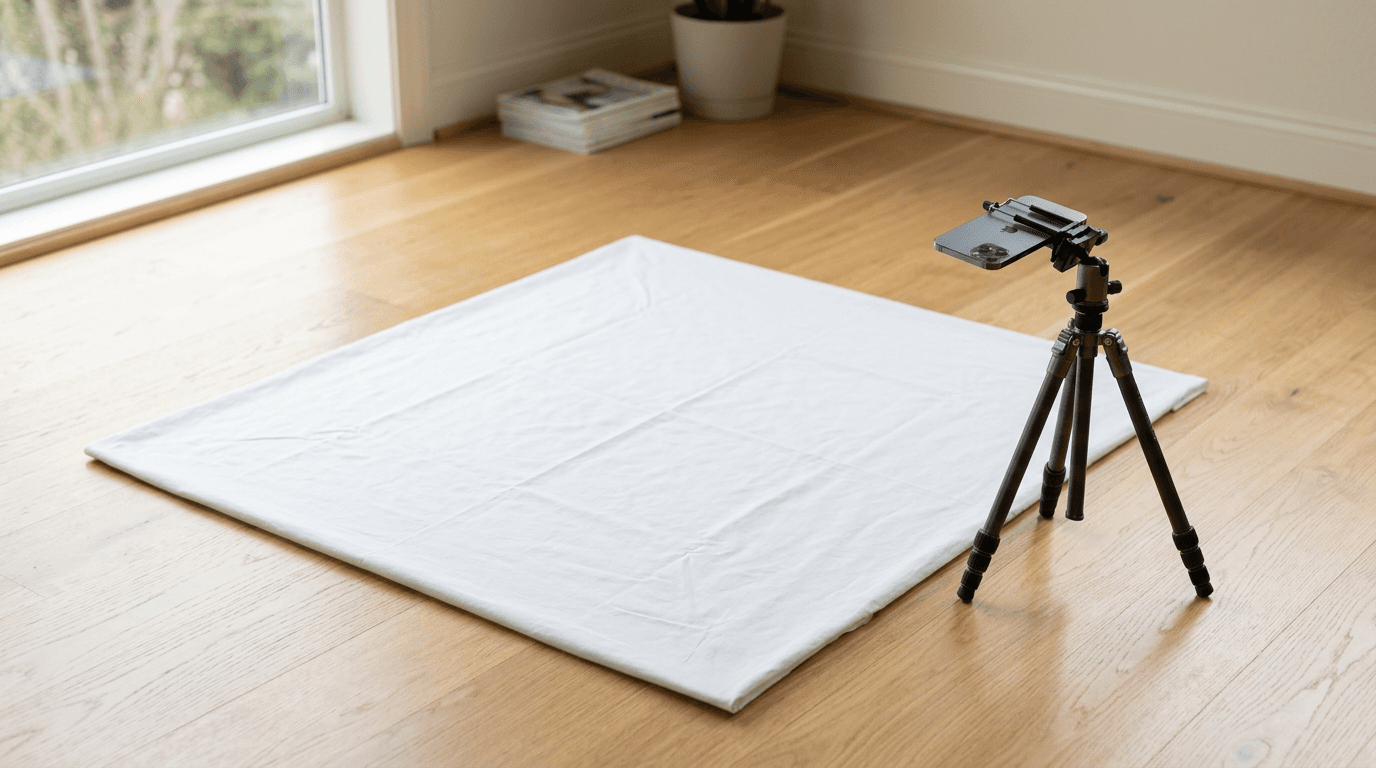
Lay a heavy, opaque white sheet or a piece of white poster board flat on a firm surface, ideally the floor directly next to a large window. A bed often proves too soft, causing the infant's weight to create deep fabric folds that cast shadows behind the ears. The surface must remain entirely taut. Iron the sheet beforehand; standard automated photo validators interpret heavy fabric wrinkles as intrusive objects or structural anomalies in the image background, triggering immediate rejection.
The Mistake: Directional Artificial Light
People fail most frequently at the lighting stage by relying on overhead room fixtures or smartphone flashes. Artificial household lighting casts multiple directional shadows, pulling deep contrast under the baby's nose and chin. When validation software scans a face, it maps the distance between facial landmarks based on light gradients. A hard shadow under the chin blends into the neck, altering the registered jawline geometry.
Instead, use indirect, diffuse natural daylight. Position the infant so the window light washes evenly across their face from the top down, not from the side. If the light source hits only one side of the face, the unlit side will plunge into shadow, failing the uniform lighting requirement. If the natural light feels too directional, hang a thin white bedsheet over the window to diffuse the intensity and scatter the light evenly across the subject.
2. Positioning the Infant Safely and Correctly

Structural Support Without Visibility
Parents searching for come fare foto passaporto frequently assume they must hold the baby upright against a wall. This approach introduces human limbs into the frame and makes stabilizing a newborn's unsupported head virtually impossible. Laying the infant flat on their back removes gravity from the equation, allowing the baby to relax their neck muscles while you focus on the camera work above them.
For example, the US baby photo specifications strictly prohibit the visibility of any secondary person or supporting device in the frame. If you attempt to hold the infant in a sitting position under a draped cloth, the contours of your arms will remain visible, and the application will be denied.
Practical rule: If you need to stabilize the infant's head to keep them looking upward, place a pair of rolled hand towels underneath the white background sheet on either side of their head, never over it. This builds an invisible cradle that keeps the head centered while ensuring your hands remain completely out of the frame.
The Mistake: Hovering Hands and Intrusive Props
The most common positioning failure involves parents physically touching the child during the capture. Attempting to hold the baby's shoulders flat or pinching their waist to keep them still introduces adult skin tones into the peripheral frame. Biometric software cannot crop out adult fingers resting on a baby's shoulder without compromising the mandated shoulder-to-head ratios. Similarly, leaving a pacifier clipped to the infant's shirt, even if it is not in their mouth, violates the rule against visible props.
3. Managing the Infant's Expression and Gaze
Biometric Facial Geometry Standards
Understanding come fare una foto formato tessera means recognizing that standard biometric software rejects any distortion of the facial features. The goal is a neutral baseline. The mouth must generally remain closed, and the eyes must remain open and directed squarely at the camera lens. This combination allows the software to measure the precise distance between the pupils and the structural width of the mouth.
While some jurisdictions offer slight leniency for newborns, expecting a perfectly closed mouth from a crying child is a losing battle. Wait for a window of calm, typically right after a feeding. Hover directly above the infant, ensuring the camera lens sits completely parallel to the floor. If you tilt the camera backward or forward, you foreshorten the forehead or the chin, artificially altering the vertical geometry of the face.
The Mistake: Exaggerated Expressions and Misdirected Gaze
The UK biometric rules for babies relax the closed-mouth rule for infants under one year old, but the requirement for clear, front-facing eyes remains firm across almost all borders. The primary failure mode here is capturing the child looking off-camera. Parents often make the mistake of using a toy or their own face to grab the baby's attention, holding the distraction several inches away from the phone. The baby locks eyes with the toy, resulting in an image where the pupils are visibly deviated from the center.
To correct this, whatever you use to capture the infant's attention must physically touch the camera lens. A small, silent sticker placed directly beside the smartphone lens gives the baby a focal point that aligns their pupils exactly where the biometric software expects them to be.
4. Framing and Capturing the Image
Focal Length and Lens Distortion
Instead of wondering foto per passaporto dove farle, families can use standard smartphone cameras provided they respect optical limits. Modern smartphones use wide-angle lenses by default. These lenses capture a broad field of view, but they introduce severe barrel distortion when placed too close to a subject. If you hold a phone twelve inches from an infant's face, the wide-angle glass will artificially magnify the nose and narrow the ears. This optical distortion alters the biometric map of the face, leading to immediate failure during automated checks.
To prevent this, you must step back. Maintain a minimum distance of four feet between the camera lens and the infant's face. At this distance, the optical distortion flattens out, capturing true anatomical proportions. You can use the camera's optical zoom (typically the 2x or 3x setting on modern devices) to fill the frame, or capture a wider shot and crop it down later.
The Mistake: Cropping Too Close During Capture
When adhering to German infant passport standards, the aspect ratio and the exact percentage of the frame occupied by the head are heavily regulated. Parents often attempt to frame the final passport photo perfectly in the camera app, cropping right to the edge of the baby's hair. This is a critical error.
Leaving generous negative space around the head and shoulders allows automated software to align, center, and crop the image to the exact millimeter requirements of a specific government. If you frame the shot too tightly at the moment of capture, the software has no background space to work with when calibrating the mandatory head-size ratios.
Common Pitfalls & Troubleshooting
Even with a solid setup, subtle environmental factors can compromise an image. If you are unsure how to correct these issues during capture, checking a dedicated troubleshooting portal can help identify which exact parameter failed. Here are the distinct failures that ruin home captures, and how to fix them.
The Chin Shadow Illusion
- Symptom: The validation software rejects the image for facial obstruction or poor contrast, even though the baby's face is entirely visible.
- Fix: Look closely beneath the infant's lower lip and jaw. If the overhead light is too directional, it casts a heavy, dark crescent under the chin. Biometric scanners read this heavy shadow as a physical beard or an altered jawline. To fix this, place a sheet of standard white printer paper standing up just out of frame near the baby's chest. This will bounce ambient window light back up into the chin, erasing the shadow.
The Grey Background Shift
- Symptom: You used a pure white sheet, but the final image shows a murky, dark grey background that fails neutrality checks.
- Fix: Smartphone cameras automatically meter the exposure based on the brightest part of the image. A massive expanse of white sheet causes the camera to under-expose the shot, turning the white into dark grey. Tap on the baby's face on your smartphone screen to lock the focus, then manually drag the exposure slider up slightly until the background registers as true white without washing out the infant's skin tones.
Asymmetrical Ear Visibility
- Symptom: The baby is looking at the camera, but the software flags the head as tilted or rotated.
- Fix: Check the visibility of the ears. If you can see the inner detail of the left ear but only the outer edge of the right ear, the infant's head is rotated on the Z-axis. The nose must point perfectly perpendicular to the floor. Use the rolled-towel technique under the sheet to gently wedge the head into a perfectly symmetrical alignment.
Pupil Glare from Reflections
- Symptom: Tiny, bright white dots obscure the pupil or iris of the baby's eye in the final photograph.
- Fix: This is catchlight from the window reflecting off the cornea. While minor catchlights are normal, a reflection that completely obscures the black pupil will fail eye-detection algorithms. Angle the baby slightly relative to the window so the light hits at a 45-degree angle rather than straight on. Never use the camera flash, as this guarantees a direct, blinding reflection in the center of the pupil.
FAQ
Can my baby's eyes be closed in the photo?
It depends strictly on the country. Some jurisdictions offer leniency for newborns under a few months old, permitting closed or partially open eyes. However, the vast majority of international passport standards require fully open, clearly visible eyes regardless of the applicant's age. Always verify the specific rules of the issuing authority before submitting.
Does the background have to be perfectly white?
Most countries require a plain white or light grey background. It must be entirely devoid of patterns, textures, or secondary objects. Wrinkles in a bedsheet, the texture of a carpet, or the seam of a car seat will cast micro-shadows that cause automated background-removal tools to fail.
Can I use a pacifier to keep the baby calm during the photo?
No. A pacifier covers the lips, mouth, and a significant portion of the jawline. Because the mouth width and jaw geometry are critical biometric markers, any object obscuring the lower half of the face guarantees an instant rejection.
What if the baby is crying while I take the picture?
An open, crying mouth significantly alters the anatomical geometry of the face, stretching the cheeks and narrowing the eyes. Because biometric standards require a neutral expression, a photo of a crying infant will fail verification. You must wait until the infant is resting quietly to capture the image.