2026 Guide to Passport Photo Requirements UK: Biometrics and Formatting
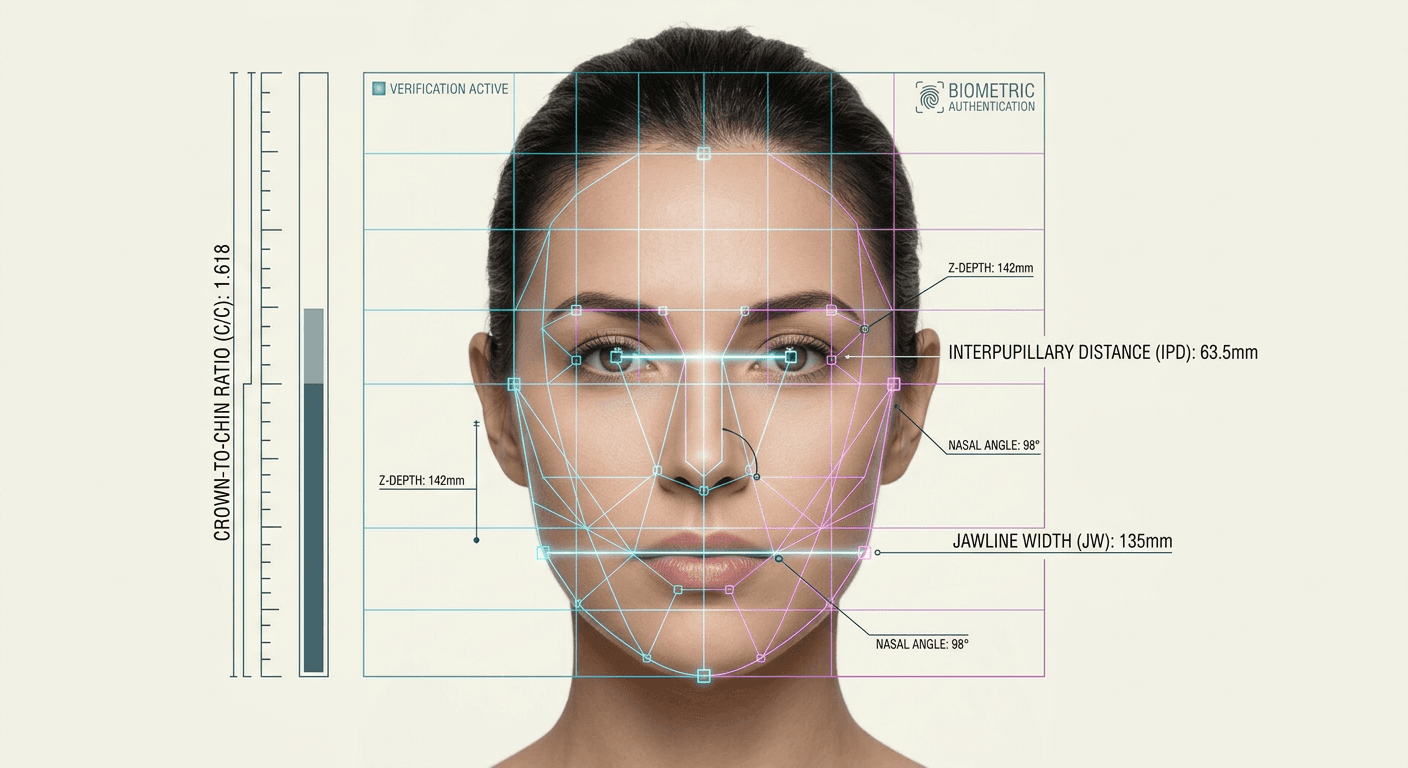
Many applicants assume HM Passport Office personnel manually inspect every submitted image for aesthetic compliance. In reality, the initial gatekeeper is a biometric algorithm that scans for specific nodal points on the face. If the distance between your pupils or the contrast between the iris and the sclera falls outside a rigid numerical threshold, the system automatically rejects the application before a human ever sees it. Understanding the core passport photo requirements uk is less about looking your best and entirely about presenting a machine-readable topography of your face.
Quick Summary
The UK passport application process relies on automated biometric analysis rather than visual aesthetics. A compliant image must map specific facial dimensions against a plain, light-colored background without sensor interference or shadows.
- Digital files must be at least 600 pixels wide by 750 pixels high, sized between 50KB and 10MB.
- Physical prints must measure exactly 45 millimeters high by 35 millimeters wide.
- Backgrounds must be plain light grey or plain cream, never white.
- Facial geometry requires a neutral expression to allow accurate nodal point measurement.
- Rules are relaxed for children under six, and further relaxed for infants under one year old.
Table of Contents
- Why passport photo requirements uk prioritize mathematical measurements
- How background contrast dictates edge detection accuracy
- Where facial expressions corrupt biometric data
- Why infant rules drop specific structural demands
- What separates digital processing from physical prints
- Which capture methods guarantee sensor artifacts
- FAQ
- Recommended Reads
Why passport photo requirements uk prioritize mathematical measurements
The international standard for travel documents, ICAO Document 9303, dictates how facial recognition systems authenticate an identity. The UK system relies on extracting a topological map of the applicant's face from a 2D image. The scanner looks for the precise distance between the pupils, the width of the mouth, and the distance from the bottom of the chin to the crown of the head.
For a physical print, this crown-to-chin measurement must fall strictly between 29 millimeters and 34 millimeters within a total frame of 45 millimeters by 35 millimeters. If the head is too large, the algorithm cannot define the outer edges of the jawline. If the head is too small, the pixel density around the eyes drops below the threshold required to map the iris.
Digital files operate on the same ratios but use pixel counts. The raw file must be at least 600 pixels wide by 750 pixels high. The system analyzes the uncompressed file to ensure the facial map remains intact. When using a dedicated Baby Passport Photo Maker, the software automatically enforces these ratios by locking the nodal points into the correct target zones before generating the final file. Without this alignment, the HM Passport Office portal will instantly flag the upload as invalid based on geometry alone.
How background contrast dictates edge detection accuracy
A persistent misconception is that a stark white background is universally accepted for travel documents. Under standard passport photo guidelines uk, a white background is explicitly forbidden. The background must be plain light grey or plain cream.
The algorithm uses background segmentation to separate the subject from the wall behind them. Pure white backgrounds cause contrast clipping against pale skin tones and reflect flash illumination back into the camera lens. This reflection creates a halo effect around the applicant's head, which erodes the outer pixels of the hair and jawline. When the algorithm attempts to measure the width of the head, it finds no distinct boundary between the cheek and the background, triggering a rejection.
Shadows introduce a different failure mode. A cast shadow on the wall behind the subject registers as an asymmetrical object intruding into the frame. A form shadow underneath the nose or chin alters the perceived shape of the nostrils or jaw. The lighting must be entirely flat and diffuse, illuminating both sides of the face equally to ensure no false topological features are created by darkness.
Where facial expressions corrupt biometric data
The requirement for a neutral expression is a mechanical necessity. Smiling pushes the cheeks upward and narrows the eyelids. This alters the measurable distance between the center of the pupil and the bottom of the chin, warping the facial geometry away from the baseline.
The impact of hair and accessories
Hair falling across the face disrupts the system's ability to anchor its map. The algorithm uses the eyebrows as a primary horizontal axis. If bangs or a heavy fringe obscure the eyebrows, the system loses its starting coordinate. Similarly, hair sweeping across the cheeks hides the true width of the jawline.
The problem with spectacles
HM Passport Office strongly advises removing glasses entirely. The frames often intersect the orbital socket, cutting through the precise area the scanner relies on to map eye shape. Furthermore, standard room lighting or camera flashes inevitably create specular highlights (glare) on the lenses. A single bright pixel of glare covering the iris renders the entire biometric scan useless.
Why infant rules drop specific structural demands
The rigid demands of biometric mapping are impossible to enforce on a newborn. Consequently, the UK system applies two distinct tiers of relaxation for young applicants.
For children under six years old, the system suspends the requirement to look directly at the camera with a neutral expression. They do not need to keep their mouth perfectly closed. However, the background color, lighting, and general framing rules remain strictly enforced.
For infants under one year old, the rules relax further. The child's eyes can be closed, and their head does not need to be completely upright. The most frequent failure mode here is parental interference. Hands, arms, or fingers supporting the child must never enter the frame. If a hand is visible, the algorithm detects a secondary object and rejects the image.
Practical rule: To capture an infant without showing hands, drape a plain light grey or cream sheet over a rigid car seat, strap the child in beneath the sheet, and photograph them from directly above, ensuring no shadows fall across their face.
Comparing these localized rules against a global Baby Passport Photo Requirements by Country reference reveals that the UK's tolerance for closed eyes in infants under one is a specific regional allowance, not a universal standard. When relying on the official United Kingdom Baby Passport Photo Guide, applicants can verify exactly which relaxations apply to their child's specific age group.
What separates digital processing from physical prints
The UK offers multiple pathways for image submission, each demanding different technical handling of the final file. The system allows direct uploads of digital files, the use of automated IDPC codes, or the traditional mailing of physical photographs.
| Submission Method | Resolution/Size Target | Handling Requirement | Common Failure Mode |
|---|---|---|---|
| Manual Digital Upload | Min 600 x 750 pixels | Unedited JPEG file | File compression artifacts |
| Photo Code (IDPC) | Pre-verified by vendor | Input code at application | Vendor lighting errors |
| Physical Print | 45mm x 35mm | Printed on photo quality paper | Inkjet banding or damage |
An Image Digital Photo Code (IDPC) is a system where a verified photo booth or studio captures the image, uploads it securely to a centralized server, and hands the applicant a code. When the applicant enters this code online, the pre-formatted image attaches to the application. While convenient, the applicant cannot independently verify the image quality before submission.
Direct digital uploads require the applicant to maintain the integrity of the file. If the file exceeds 10MB or falls below 50KB, it is rejected. You must upload the original, unedited file directly from the device that captured it, taking care to consult the service's Privacy Policy regarding how long your biometric data is stored during processing.
Which capture methods guarantee sensor artifacts
Capturing an application image at home introduces risks related to modern smartphone image processing. The algorithms built into modern phone cameras are designed to make photos look aesthetically pleasing, which actively destroys biometric data.
Using a smartphone's "Portrait Mode" is an automatic failure. This mode uses artificial intelligence to identify the subject and artificially blur the background (simulated bokeh). In doing so, it often blurs the outer edges of the ears, hair, or jawline. The biometric scanner reads this artificial blur as missing data and rejects the file.
Webcams and front-facing "selfie" cameras present another failure mode. Front-facing lenses use wide-angle distortion, which stretches the center of the face and pulls the ears backward, corrupting the nodal measurements. They also feature smaller sensors that introduce heavy digital noise (grain) in low light. If you are using software to correct these issues, ensuring it carries a 100% Refund Policy protects you against unexpected rejections caused by aggressive digital compression.
FAQ
Can I wear makeup in my application image? Yes, provided it does not alter your fundamental facial features. Heavy contouring that creates false shadows or changes the apparent shape of your nose or jawline will confuse the biometric scanner and result in rejection.
Why was my photo rejected for being "too close"? The scanner needs a minimum border of background space around your head to establish the outer edges of your hair and shoulders. If the crop is too tight, the crown-to-chin measurement exceeds the maximum 34-millimeter threshold.
Do I need a professional studio to take an infant's photo? No. The HM Passport Office accepts photos taken at home on a smartphone, provided they meet the technical lighting, background, and framing criteria. A studio is not legally required.
Can I digitally remove a spot or blemish? No. Any manual alteration using editing software, including red-eye reduction, skin smoothing, or blemish removal, invalidates the file. The system detects the metadata changes and rejects the image.
What happens if my digital upload code expires? UK photo codes (IDPC) are typically valid for six months from the date of capture. If the code expires before you submit your application, the file is purged from the server, and you must obtain a new image. If you encounter issues retrieving an active code, the processing platform's Help Center can outline recovery steps.